
Featured Content: A Carousel for Your Viewer Home Page
The new Featured Content carousel lets your viewer home page showcase multiple highlighted videos at once, chosen by recency, by tag, or curated by hand, instead of leading with a single pinned video.
Viewer Home page has had one starting role to fill: a pinned hero video at the top, with the channel list beneath it. It works, but it means one video does all the heavy lifting, and the rest of your library waits below the fold for someone to go looking for it.
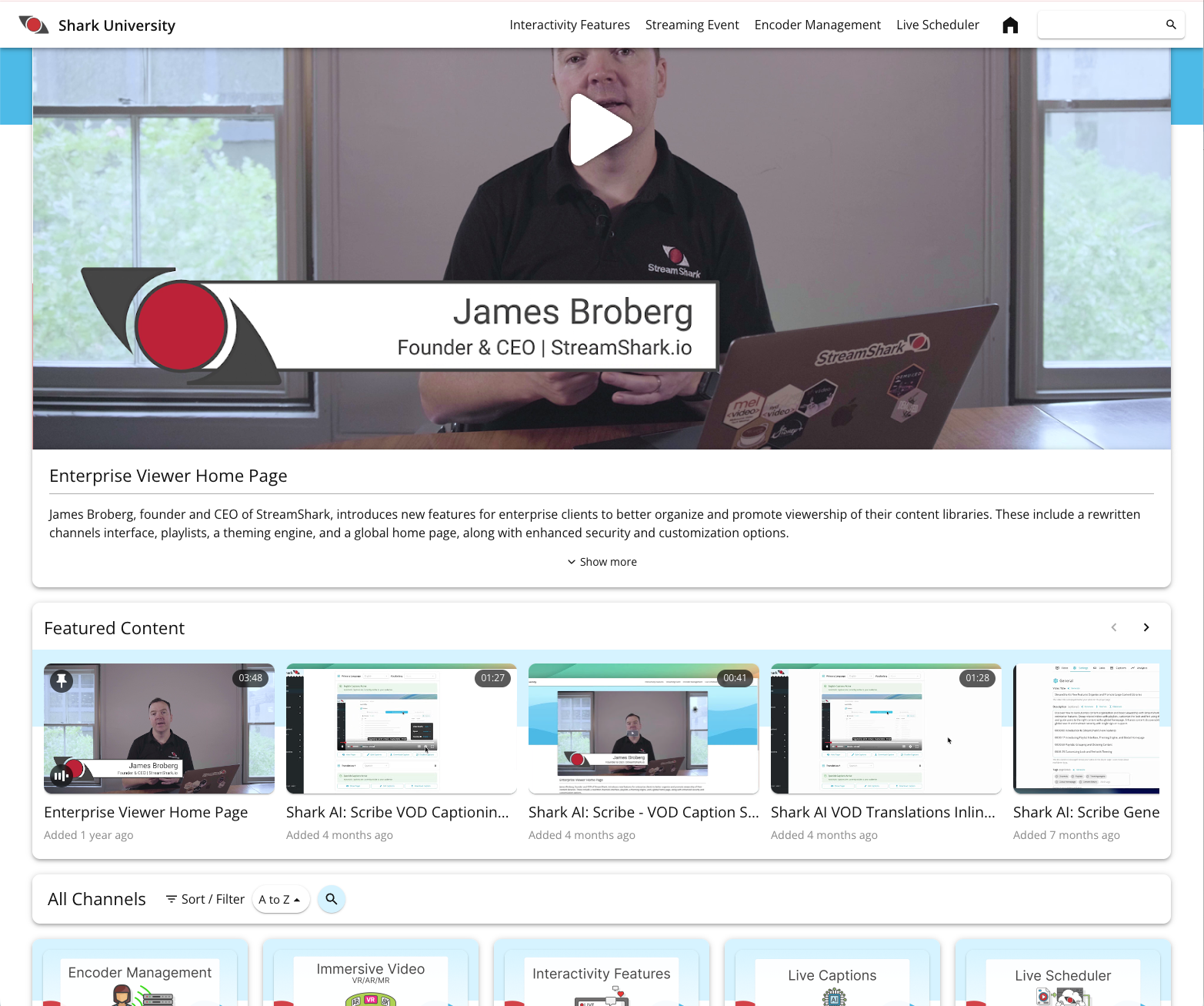
Today we’re pleased to introduce the Featured Content carousel, a new row on the Home page that showcases a shortlist of videos at once, so more of your library gets a chance to catch someone’s attention.
Three ways to decide what gets featured
The carousel is built around curation, and different libraries call for different approaches. You can populate it in whichever way suits your content:
- Most recent – the carousel updates itself as you publish. New content appears at the top of the home page automatically, with no manual step to forget on a busy day.
- By tag – feature everything tagged for a campaign, a season, a product launch or an onboarding track. Tag a video correctly and it takes its place in the carousel on its own.
- Manually picked – hand select the exact videos, in the exact order, when the home page needs to tell a deliberate story.
Automatic modes keep an active library looking current with no ongoing effort. Manual curation gives your comms or marketing team precise control when a specific message matters.
The hero player does double duty
Pinned hero content hasn’t gone anywhere. It remains the anchor of the page, the all-hands recording, the flagship keynote, the welcome video every new starter should watch first. What’s changed is that it’s no longer limited to one video. The carousel isn’t a list of links that navigates viewers away, selecting a video hot-swaps it into the hero player above, in place. The page doesn’t reload, the layout doesn’t shift, and the viewer doesn’t lose their spot.
That turns the home page from something viewers pass through on their way to a channel into somewhere they can browse and watch, sampling several pieces of content in the time it used to take to load one.
A Home Page that was already doing more than one job
The carousel joins a set of capabilities that make the home page a genuine destination rather than a link tree. Channels and playlists let you group a large library into something navigable, onboarding in one place, all-hands in another, product training in a third. Search covers titles and metadata, and with Shark AI: Scribe, the spoken words inside your videos too, so viewers can find the two minutes that matter rather than the ninety-minute recording they sit in. Viewer management and single sign-on keep internal content internal, restricted to the people who should see it. And branding and theming style the page in your organisation’s colours and logos, so it reads as yours rather than as a vendor’s.
Taken together, that’s a private, branded, searchable video destination for your organization. And the Featured Content carousel now gives it a front page worth arriving at.
Available now
The Featured Content carousel is live on viewer home pages today. You can see it in action on Shark University, our own StreamShark training channel.
Home pages are available on selected plans. If you don’t see the option on your account, or you’d like to talk through how your home page should be curated, contact our team or your Account Manager. Full setup steps are in our support documentation.