Live Scheduler Update: Recurring Events & Captions

Get ready for a smarter, more efficient way to manage your live schedules. We’re pleased to announce a significant update to our Live Scheduling tool, bringing powerful automation and greater accessibility to your broadcasts.
You can now set a Live Schedule to repeat over a date range, or select specific dates/days of the week you wish it to go live. Additionally you can seamlessly add caption support to your live schedules.
Automate Your Recurring Live Schedules
Imagine setting up a month’s worth of recurring training sessions or product demos in just a few clicks. Our new scheduling logic makes this a reality.
Here’s how it works: Simply set a start and end date (within a 30-day window), choose the time, and then specify which days of the week you’d like to go live (e.g., Tuesdays and Thursdays only). It’s set-and-forget scheduling at its best.
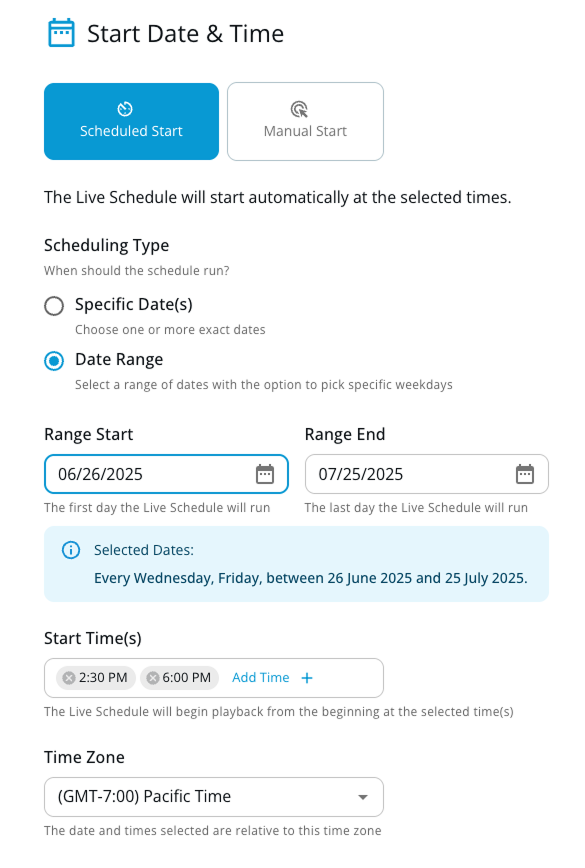
This is a great for anyone who wants to:
- Automate Targeted Broadcasts: Need to run a product demo every weekday morning for a two-week product launch? Simply select the date range, tick Monday to Friday, set the time once, and you’re done.
- Maximize Training Efficiency: Schedule a compliance training video to air every Monday and Wednesday afternoon for the next four weeks, ensuring all employees have multiple opportunities to watch live.
- Create Consistent Programming: Run your weekly “What’s New” segment every Friday morning for the entire month, all scheduled in a single action.
Now with Wider Caption Support
In our ongoing commitment to accessible streaming, we are introducing support for a wider range of caption formats, including WebVTT. This allows you to easily add captions to your live schedule, ensuring a better and more comprehensible experience for every viewer. In addition there is no language limitation, all languages CJK, Arabic, Hindi, etc are supported.
The benefits of adding captions to your live streams are clear:
- Increased Accessibility: Provide an essential viewing experience for individuals who are deaf or hard of hearing.
- Improved Comprehension: Captions are proven to aid understanding, especially for viewers in noisy environments, those for whom the broadcast language is not their first, or anyone who benefits from visual text reinforcement.
- Wider Audience Reach: Cater to the growing number of viewers who watch videos in sound-sensitive environments, like offices, libraries, or on public transit.
These new features are available to our enterprise customers currently using our Live Schedule feature. If you wish to test out Live Scheduling, just reach out to our sales team!
More from the blog
What to look for in a secure enterprise streaming platform for internal live events
What separates a secure enterprise streaming platform from a login page in front of a player, what to ask the vendor, and five tests to run...
Live stream analytics for corporate communications, what to measure and how to check a platform can measure it
The five questions a communications team needs answered after a town hall, which metrics matter during the event and after it, and how to test a...

Why corporate live streams fail at scale, and how to design global event delivery that holds
Corporate live streams fail at one point in the path nobody planned to lose. Where those points are, and how enterprise teams design them out with...
See it on your own content
Book a walkthrough of StreamShark with your own video, your own encoder and the viewers you need to reach.