Shark AI: Scribe Just Got Smarter. Full Caption Search and VOD Captions and Translations.
When we launched Shark AI: Scribe, we set out to solve one of the biggest bottlenecks in video management: the time and effort it takes to generate captions, titles, descriptions, chapters, and tags for every video in your library. Scribe automated all of that.
But generating metadata is only half the story. The real value comes from what you can do with it. Today, we’re announcing two major updates to Scribe that make your video library more searchable, more accessible, and easier to manage than ever.
Full Caption Search
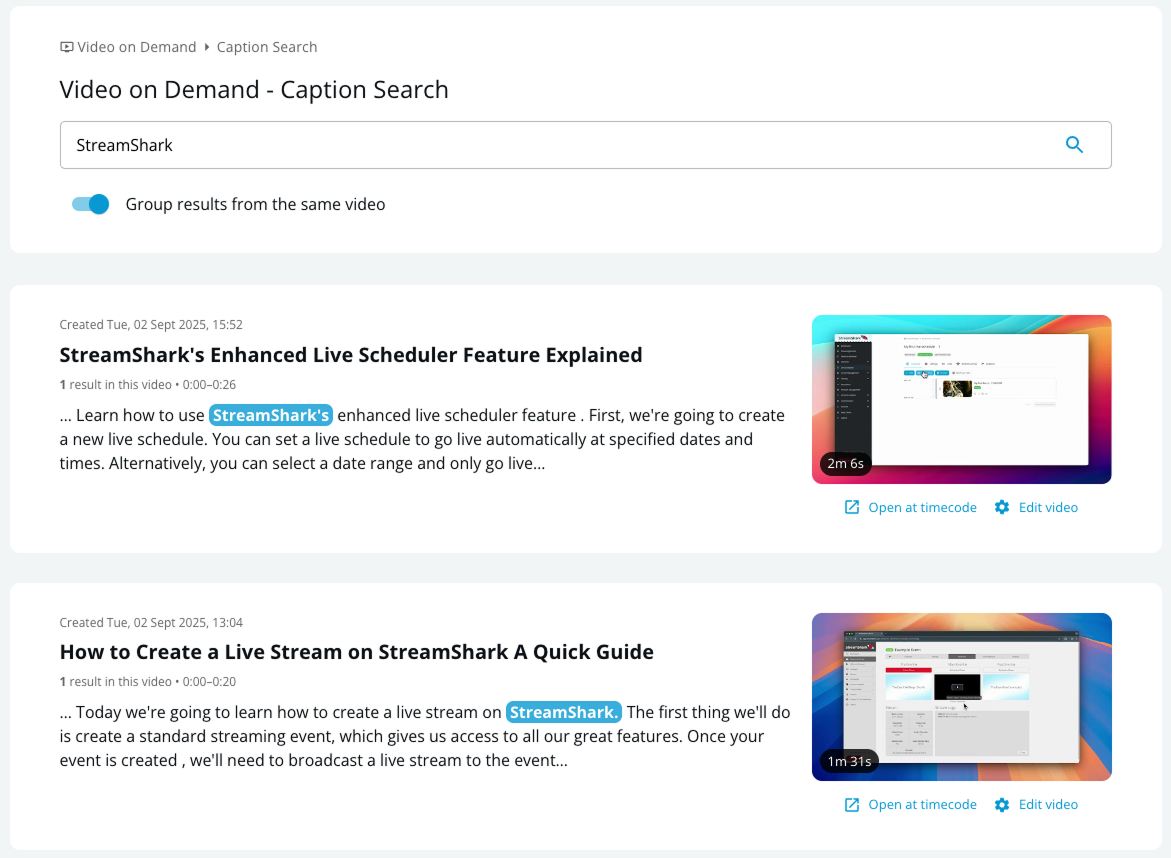
Every caption Scribe generates is now fully searchable, across your entire VOD library, from a single search bar.
Type a keyword or phrase, and Scribe surfaces every video where it was spoken. Click a result, and you’re taken directly to that moment in the video. No scrubbing through timelines. No guessing which recording it was. Just the exact moment you were looking for.
Search is available on both the admin portal and your end-user channels and homepage, so your team and your audience both benefit.
What This Unlocks
A searchable knowledge base. Your video library is full of valuable information that’s been locked inside individual recordings. Full Caption Search turns it into a resource your organization can actually navigate. When someone needs to find what the CEO said about the product roadmap, or which training session covered a specific compliance topic, they can search for it and land on the exact moment.
Faster content discovery for viewers. On your public or internal channels, viewers can search across your entire catalog by what was said, not just by title or description. This makes long-form content libraries dramatically easier to use.
Efficient production workflows. Producers and editors can locate specific quotes, segments, and topics across a large archive in seconds, replacing hours of manual review.
VOD Captions and Translations
Scribe already generated captions for your VODs automatically. Now it can translate them too. Scribe can produce translated captions for your VOD library, making your content accessible to multilingual audiences without any manual translation work.
This brings the same translation capability you may already know from StreamShark’s live captioning tools to your on-demand content. Whether you’re reaching a global workforce with internal communications or expanding your audience across languages, Scribe handles the heavy lifting.
On top of that, you can now edit your captions and translations directly within the StreamShark platform. Click into any caption line, make your change, and save. No exporting VTT files, editing in a separate tool, and re-uploading. If a proper noun gets misheard or a translated phrase needs a more natural phrasing, you can fix it in seconds without leaving the platform.
The Scribe Workflow, End to End
Together, these updates complete the Scribe workflow. Generate captions and metadata automatically. Translate them for multilingual audiences. Refine them with inline editing. Then make every word searchable across your entire library.
See a demo at NAB Show 2026!
The StreamShark team will be at NAB Show 2026, if you want to speak with us in person about this feature, or get a demo, come visit our booth!
More from the blog
Introducing Multi-DRM for VOD: Studio-Grade Protection Across Every StreamShark Endpoint
Widevine, FairPlay and PlayReady now protect your video library as well as your live events. With this release, every media endpoint on StreamShark carries the same...
When Video Isn’t Enough, Bring the Data Into the Stream
Watch a live football match and you can see what is happening on the pitch. But there is a lot more information being generated at the...
Audit Logs: Know What Changed, and Who Changed It
Audit Logs give you a searchable, filterable record of activity across your StreamShark account, in the portal and via the API. Available now for enterprise customers....
See it on your own content
Book a walkthrough of StreamShark with your own video, your own encoder and the viewers you need to reach.