HLS latency explained, and what LL-HLS changes

A standard HLS live stream plays 20 to 30 seconds behind the camera. Most of that is by design. The video is cut into 6 second segments and the player holds three of them back before it starts, which is 18 seconds before the encoder, the CDN and the segment still being written are counted.
Low-Latency HLS (LL-HLS) publishes each segment in 1 second parts and lets the player hold back three parts instead of three segments. That brings a live stream to about 5 seconds with the same players and CDNs, at the cost of a thinner buffer. In between, a 2 second segment on ordinary HLS gives 10 to 12 seconds with nothing else changed. This guide covers where the seconds go, what LL-HLS actually does, and which of the three to pick.
What is latency in live streaming?
Latency is the delay between something happening in front of the camera and a viewer seeing it, measured glass to glass. It is not buffering. Buffering is the player stalling because it ran out of video. Latency is how far behind live the player is while it plays smoothly.
Every stage between the camera and the screen adds some.
| Stage | What adds the delay | Typical |
|---|---|---|
| Encoder | Capture, encoding and the wait for the next keyframe | 1 to 3 seconds |
| Contribution | RTMP or SRT from the venue to the ingest server | Under 1 second, more on a bad link |
| Transcoding and packaging | Making the quality ladder and writing each segment to its full length before it is published | One segment length |
| CDN | Fetching the segment to the edge the first time | Under 1 second |
| Player | The buffer it holds before and during playback | Three segments, or three parts |
The encoder and the contribution link are the same whatever the delivery protocol. The last three stages are where HLS, LL-HLS and WebRTC differ.
Why does HLS have 20 to 30 seconds of delay?
Because HLS delivers video as files, and a file cannot be served until it is finished. Apple’s HLS authoring specification says target durations “SHOULD be 6 seconds”, so the first frame of each segment waits 6 seconds for the last frame before anyone can download it. Apple’s own engineers put it this way at WWDC 2020, “if every segment is six seconds, then each segment has a six-second publishing delay.”
Then the player holds back. The HLS specification defines a HOLD-BACK value as the minimum distance from the end of the playlist at which a client should start, and says its “absence implies a value of three times the Target Duration.” hls.js, the player behind most browser playback, does the same with a default of three segments and warns that lowering it “is likely to cause playback stalls.”
Three 6 second segments is 18 seconds. Add the segment the packager is still writing, a 2 second keyframe wait at the encoder and a second or two of contribution and CDN, and 20 to 30 seconds is the normal result. The buffer is not waste. It is what lets a viewer on a flaky connection miss a segment and keep watching.
How does LL-HLS reduce latency?
LL-HLS keeps the 6 second segments and publishes each one in smaller pieces as it is encoded, so the player no longer waits for a whole file. Apple announced it at WWDC 2019, dropped the original HTTP/2 push requirement in early 2020 and shipped player support in iOS 14 that autumn. It is now part of the same HLS specification, not a separate protocol.
Five additions to the playlist do the work.
- Partial segments. Each segment is split into parts, with a recommended part target duration of 1 second. The spec describes them as “a parallel channel for distributing media at the live edge”. A part is playable the moment it is written.
- Blocking playlist reload. Instead of polling for a new playlist every few seconds, the player asks for the next part by number and the server holds the request open until that part exists.
- Preload hints. Every playlist carries the URL of the next part before it is finished, so the player can request it early.
- Playlist delta updates. The player can ask for only what changed since its last playlist, which keeps the reloads small when they happen every second.
- Rendition reports. Each playlist reports where the other quality levels are up to, so switching bitrates doesn’t cost a round trip.
The hold-back changes with it. In low-latency mode the player starts at PART-HOLD-BACK, which the spec says “SHOULD be at least three times the Part Target Duration”. Three 1 second parts is 3 seconds of buffer instead of 18, and with the encoder and the network on top the stream lands at about 5 seconds.
The server side has to keep up. The spec’s low-latency server profile requires playlists and segments to be served over HTTP/2 or HTTP/3, every rendition to be updated in sync within one part duration, and CDNs to recognise blocking requests and hold duplicates until the cache fills. That last one is why not every CDN or packager offers it, and why some that do fall back to ordinary HLS under load.
HLS vs LL-HLS, what do you give up for 5 seconds?
Buffer, mostly. A standard HLS player can lose 18 seconds of delivery and still be playing. An LL-HLS player has about 3, so the same hiccup that nobody noticed before becomes a stall. Everything else on the list follows from the player and the CDN doing six times as much work per second of video.
| Standard HLS | LL-HLS | |
|---|---|---|
| Latency | 20 to 30 seconds | About 5 seconds |
| Unit the player fetches | 6 second segment | 1 second part |
| Player buffer | Three segments, about 18 seconds | Three parts, about 3 seconds |
| Playlist requests | One per segment | One per part, held open by the server |
| CDN | Any HTTP cache | HTTP/2 or HTTP/3 and blocking-request support |
| Player support | Everything that plays HLS | Apple players since iOS 14, hls.js, most current players, not every smart TV or set-top box |
| DRM and features | Mature everywhere | Supported, but each packager and player pairing needs checking |
There is a middle setting that gets ignored. Ordinary HLS with 2 second segments instead of 6 keeps every player, every CDN and the full three-segment buffer, and lands at 10 to 12 seconds. For a town hall with a Q&A, that is usually the delay that matters, because nobody can tell 11 seconds from 5 when they are typing a question, and they can tell 25.
LL-HLS vs WebRTC, when does 5 seconds not do?
WebRTC is the answer under a second, and it gets there by not being a file at all. It sends frames over UDP as they are encoded, with no segments, no playlists and no hold-back, which is what video calls run on.
The price is that a CDN can’t cache it. Every viewer needs a media server session, so scale comes from stacking servers rather than from an HTTP cache that serves the same file a million times. That is fine for a panel of speakers or a few hundred people on a trading floor, and expensive for an audience. The usual design is both, WebRTC for the people who need to talk back and HLS or LL-HLS for everyone watching.
Can the encoder reduce HLS latency?
Only at the edges. The segment length and the player buffer are set on the delivery side, and no encoder setting changes them. Two settings do matter.
Keep the keyframe interval at 2 seconds. Segments are cut on keyframes, so an encoder set to auto, which in x264 is 250 frames or 8 seconds at 30 fps, forces 8 second segments and a 24 second player buffer whatever the platform wanted. Our OBS settings guide covers that field and the rest of the Output tab.
Publish to the nearest ingest. Contribution is the one stage where distance counts, and a round trip across an ocean adds to every frame. OBS’s Low latency mode under Settings, Advanced, Network only changes how it hands packets to the connection. It does nothing to the HLS delay the viewer sees.
The three latency options on StreamShark
A StreamShark live event is created as one of three types, and the type sets the delay.
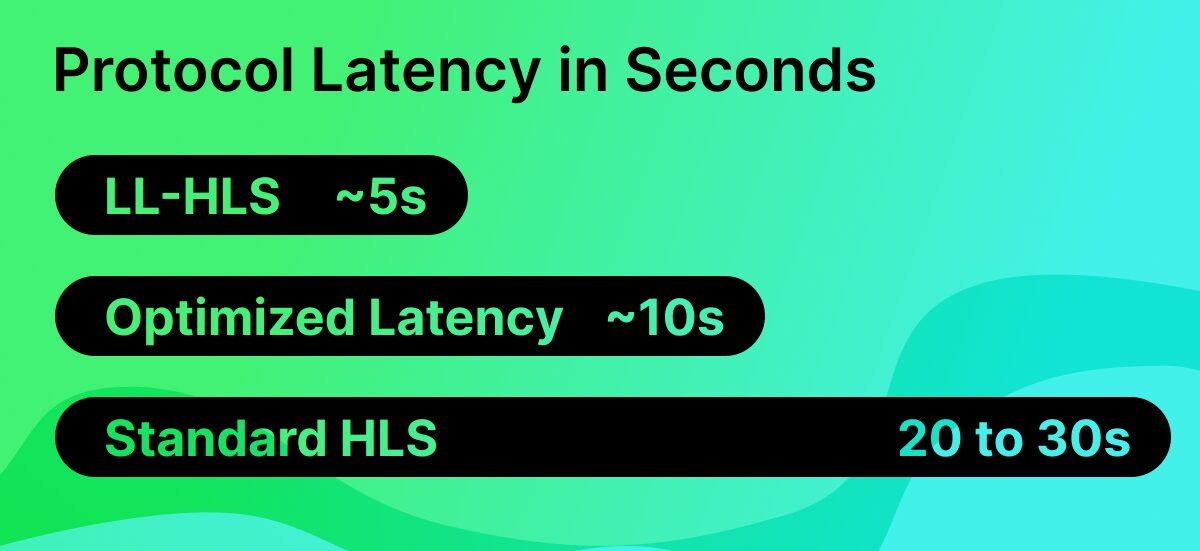
- Standard. 6 second segments, 20 to 30 seconds of latency, every feature and every player.
- Optimized Latency. 2 second segments and a tuned player buffer on ordinary HLS, which the help center puts at a consistent 10 to 12 seconds. It keeps DRM, DVR, multistreaming, CMCD and captions, and the encoder settings don’t change. The event type is switched on per account by support.
- Low Latency. LL-HLS, around 5 seconds, with the player and feature limits above.
Whichever type you pick, choose the ingest closest to the production signal. The rest of the delivery, the live streaming platform, the quality ladder and the Multi-CDN, is the same for all three.
Common questions
Is there always a delay on a live stream?
Yes. Even a video call runs a few hundred milliseconds behind, because encoding, sending and decoding each take time. “Live” on a stream means 5 to 30 seconds depending on the delivery protocol, and the figure is a choice, not a fault.
What is a good latency for a live stream?
The lowest you can run without stalls for the audience you have. Under 15 seconds keeps a chat or Q&A feeling live. Under 5 is for auctions, betting, watch-alongs and anything where viewers compare the stream with another source. Under 1 is for people who need to talk back, and that is WebRTC.
Does a shorter keyframe interval reduce HLS latency?
It stops a long one from adding to it. Segments can only be cut on a keyframe, so the keyframe interval is the shortest segment the packager can make. 2 seconds is the standard. Going below it costs picture quality for no latency gain, since the segment length is set by the platform.
Why is my stream further behind than the platform says?
Usually the player drifted. A player that stalls once catches up only if it is set to, so a viewer who buffered early can sit 10 seconds further back for the rest of the event. Reloading the page puts them back at the hold-back distance. The other common cause is an 8 second keyframe interval at the encoder.
More from the blog
What to look for in a secure enterprise streaming platform for internal live events
What separates a secure enterprise streaming platform from a login page in front of a player, what to ask the vendor, and five tests to run...
Live stream analytics for corporate communications, what to measure and how to check a platform can measure it
The five questions a communications team needs answered after a town hall, which metrics matter during the event and after it, and how to test a...
Why corporate live streams fail at scale, and how to design global event delivery that holds
Corporate live streams fail at one point in the path nobody planned to lose. Where those points are, and how enterprise teams design them out with...
See it on your own content
Book a walkthrough of StreamShark with your own video, your own encoder and the viewers you need to reach.